


BTC Cloud Miner
0.00.00 Reviews
App Specs
- Version
- 21.0
- Updated On
- License
- Free
- Downloads
- 10,000+
- Developer
- NextGenerationAI
- Categories
- Finance
- Platform
- Android
Screenshots
 Analysis by AppCompare
I usually approach Bitcoin-mining apps with caution: a simple interface can make a complicated idea look more predictable than it is. BTC Cloud Miner is aimed at people who want to explore cloud-based mining without setting up physical equipment. That distinction is the key to judging it. The app’s appeal is convenience, but convenience is not the same as a guaranteed return, so I’d treat it as a way to learn and experiment rather than as a dependable source of income.
What cloud mining changes
Traditional Bitcoin mining involves specialized hardware, electricity, cooling, and ongoing maintenance. A cloud-mining app shifts the experience to a phone interface and remote computing. In the case of BTC Cloud Miner, the central idea is that you can follow mining activity without running equipment at home. That removes a substantial practical barrier, especially for someone who is curious about the process but has no interest in building a mining setup.
The trade-off is that you are relying on a service rather than controlling the hardware yourself. You cannot assess a remote operation just by looking at a balance or progress display. I’d keep that distinction in mind whenever an app presents activity in a clear, satisfying dashboard: visible progress can be useful for following the experience, but it should not be treated as proof of profitable mining or a promise that a displayed amount will become spendable Bitcoin.
Getting Started with BTC Cloud Miner
First things first, let’s talk about the setup. Installing the app was a breeze. It is a free finance app from NextGenerationAI, with an Everyone age rating, and it is listed for devices running Android 9 or later. The current version is 21.0. Once you’re in, the app welcomes you with an intuitive interface that even a crypto newbie can navigate without breaking a sweat.
The app provides a virtual mining environment, which means you don’t need any physical mining equipment. It’s all about simplicity here. You sign up, and with a few taps, you’re ready to start mining. The published description points to an experience centered on plans that do not expire, an appealing idea for someone who wants to explore without feeling pushed by a countdown. I would still read the terms attached to any plan carefully before committing money.
Following progress in practice
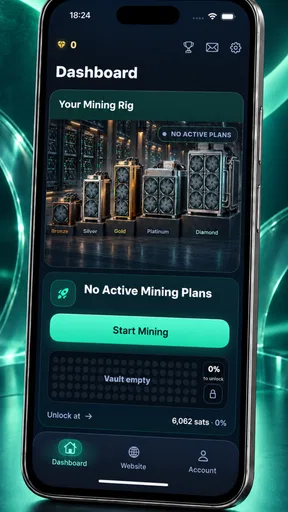
So, how does the mining actually work? Well, the app runs mining operations on cloud servers, so you can let it do its thing while you go about your day. I found it quite satisfying to check back and see my virtual wallet growing, albeit slowly. It’s like watching a plant grow, but with fewer watering duties!
That hands-off rhythm is the most useful way to think about the experience: start a session or plan, then check in occasionally rather than treating the app like a live trading screen. For a realistic everyday use, I’d look at it briefly during a break, note whether the displayed progress has changed, and then close it. Frequent refreshing does not make remote mining faster, and it can encourage you to focus on small movements that may not matter when you eventually consider fees, withdrawal conditions, or the value of Bitcoin.
Worth Reading Before You Choose

Flipboard Shows What News Apps Must Do Beyond the Feed

Switching to Android Auto Means Rethinking Your Driving Routine

Google Calendar Makes a Crowded Week Easier to Manage

Ludo King Makes the Most of the Minutes Between Plans

Baby Panda World Brings Quick Play to Modern Phones, but Its Game Library Feels Busy

ESPN’s Live Game View Makes Following Close Games Easier
One practical habit is to keep a simple private note of what you have paid, what the app shows, and any stated conditions for accessing a balance. This is especially helpful if you are comparing a free experience with a paid plan. It turns an easy-to-misread progress screen into something you can evaluate calmly, without relying on memory or letting an attractive running total shape your expectations.
Plans, costs, and expectations
One thing I noticed is that the app offers different plans. There’s a free tier, which is great for testing the waters, but if you’re serious about mining, you might want to explore their premium options. These plans promise higher mining rates and faster returns, which sounds tempting for those eager to maximize their crypto earnings.
Paid items range from $1.49 to $129.99 each, so I would not tap through a purchase casually. Before spending, I’d check exactly what the item provides, whether it renews, how long its benefits last, and what rules apply to any balance or withdrawal. The fact that plans are described as not expiring may ease time pressure, but it does not by itself settle those other questions. If the terms are not clear enough for you to explain them in your own words, sticking with the free option is the more sensible choice.
This is where cloud mining differs from the usual alternatives. A home mining rig gives an owner direct control over the hardware but demands equipment and operating costs. A cryptocurrency exchange is more straightforward if the goal is simply to buy or sell Bitcoin, though it does not teach the same mining-themed workflow. This app sits between those approaches: easier to try than hardware mining, but less direct than buying Bitcoin and not something I’d use as a substitute for either without understanding its plan terms.
Bitcoin’s market price can also move independently of any in-app progress. A growing displayed balance does not guarantee that its eventual value will rise, and a higher-rate plan is not automatically a better deal. I would compare the amount spent with the conditions for receiving anything back, rather than judging a plan by its headline rate alone. Cloud mining is not a shortcut around market risk.
A calm way to test the experience
If you’re new to the topic, I’d use the app as a small, structured experiment. Begin with the free experience, learn what the dashboard calls progress and earnings, and avoid paying until you understand how the app describes its plans. If you decide to make a purchase, set a personal spending limit first and treat it as money you might not recover. That approach makes it easier to explore without confusing an entertaining interface with an investment case.
It is also worth separating two questions: “Is this app easy to check?” and “Is this a good way for me to obtain Bitcoin?” The first is about usability; the second depends on the plan’s terms, costs, and the risks you are willing to take. Someone who wants direct exposure to Bitcoin may find a conventional exchange easier to understand. Someone who wants to see a simplified cloud-mining process may prefer this app, provided they stay cautious about paid upgrades.
User Interface and Experience
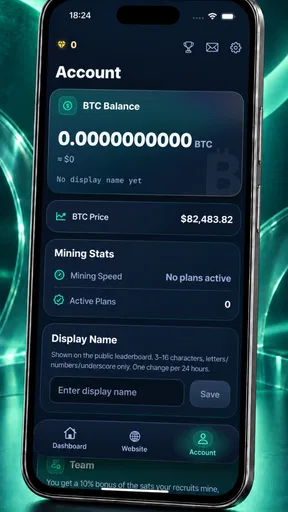
The design of the app is sleek and modern, making it a pleasure to use. Navigation is smooth, and I didn’t encounter any annoying lags or crashes — a definite plus in my book. The dashboard gives you a clear view of your mining progress, earnings, and even some handy stats about Bitcoin trends.
The developers have clearly put a lot of thought into making it user-friendly. For those who might feel a bit lost in the crypto lingo, there’s a handy FAQ section that explains the basics. It’s like having a mini crypto guide right in your pocket.
For a beginner, that approachable presentation is a genuine plus, but it can also make the underlying uncertainty easy to overlook. I’d use the explanations to learn the vocabulary, then make purchase decisions separately and slowly. A useful routine is to read one unfamiliar term at a time and check whether it changes your understanding of the plan. If the dashboard’s figures are not clear to you, do not assume that a polished chart makes them equivalent to money you can withdraw.
Security and Support
Now, let’s talk security. In the world of digital currencies, security is paramount. The app uses encryption to secure your data, and I appreciated the optional two-factor authentication for an extra layer of protection. It’s comforting to know that my virtual stash is safe.
If you ever run into any issues, the app offers customer support that’s just a few taps away. I tested this out with a couple of queries and received prompt, helpful responses. Nothing beats the peace of mind that comes with knowing help is readily available if you need it.
Even with account protections, I would avoid reusing a password from another service and would keep control of the email or login method tied to the account. Security features can reduce some risks, but they cannot make every financial decision safe or guarantee access to funds under every circumstance. For a paid plan, I’d save a record of the purchase and the terms shown at the time, so I can refer back to them if I later have a question.
Who is likely to benefit most?
The app is best suited to a curious beginner who wants a low-friction introduction to the idea of cloud mining and is comfortable treating the experience as exploratory. It may also suit someone who enjoys checking a simple progress display now and then, as long as they do not depend on it for regular income. Its free starting point makes it easier to understand the interface before considering any paid item.
I would skip it if you need predictable returns, want full control over mining hardware, or are looking for the clearest route to buying and holding Bitcoin. It is also a poor fit if you find progress dashboards tempting enough to spend beyond a limit or if the purchase and withdrawal terms are not easy for you to evaluate. In those cases, learning about mining through independent educational material, or using a more direct financial service for your actual goal, may be a better match.
The app has 10K+ installs and an average rating of 0.0, so I would not use ratings as a substitute for my own careful assessment. That does not determine whether the app will suit you, but it reinforces the value of starting modestly and reading the details yourself. For me, the decision comes down to whether the cloud-mining format is interesting enough to explore without expecting it to behave like a savings account or a guaranteed investment.
Final Thoughts
All in all, the app is a nifty tool for anyone interested in exploring the world of Bitcoin mining without the usual overhead. It’s approachable for beginners, thanks to its straightforward setup and user-friendly interface. While you may not become a Bitcoin billionaire overnight, it’s a fun way to get involved in the crypto scene and potentially earn a little on the side.
Give it a whirl if you’re curious, and who knows, maybe you’ll get hooked on the thrill of watching your digital coins grow. Happy mining!
Pros
- User-friendly interface for beginners.
- Low energy consumption while mining.
- Secure and reliable cloud infrastructure.
- No need for expensive hardware.
- 24/7 customer support available.
Cons
- Requires stable internet connection.
- Potential hidden fees in subscription.
- Limited mining algorithm options.
- Payouts can be slow at times.
- Ads present in the free version.
FAQs for BTC Cloud Miner
What is BTC Cloud Miner and how does it work?
BTC Cloud Miner is an application designed to facilitate cryptocurrency mining through a cloud-based service. Instead of using physical hardware, users can mine Bitcoin by leveraging remote servers. This app simplifies the process for those without technical skills or access to expensive mining rigs, making it accessible for beginners.
Is BTC Cloud Miner safe to use?
BTC Cloud Miner is generally safe if downloaded from reputable sources like the Google Play Store or Apple App Store. However, it's important to read user reviews and check for any security certifications within the app. Users should also ensure their devices have updated antivirus software to prevent potential threats.
How do I start mining with BTC Cloud Miner?
To begin mining with BTC Cloud Miner, download the app, create an account, and choose a mining plan that suits your needs. The app provides a simple interface to monitor your mining progress and earnings. Some plans may require an initial investment, so review the options carefully before committing.
What are the costs associated with BTC Cloud Miner?
BTC Cloud Miner may offer free plans with limited capabilities, but more effective mining typically requires a subscription or purchase of a plan. Costs vary depending on the plan's power and benefits, so users should evaluate their budget and desired level of investment to choose the best option.
Can I withdraw my mined Bitcoin easily from BTC Cloud Miner?
Yes, BTC Cloud Miner allows users to withdraw their mined Bitcoin. The app typically provides a straightforward process to transfer funds to your wallet. However, check the app's withdrawal policies and any associated fees before proceeding, as these can vary between different plans and services.


